Your portfolio now has a doctor
Most of us open our portfolio, see green or red, and close the app. The numbers tell us if we are up or down. They do not tell us if something is going wrong, or what to do about it.
Portfolio Doctor fixes that. After every market day, it looks at each share you own and gives you a simple checkup: one score, four vital signs, a tag on every stock and a few small steps to take today.
Think of it like a visit to a good doctor. You do not need to understand medicine. You just need to hear what is fine, what to keep an eye on and what needs care.
One score from 0 to 100
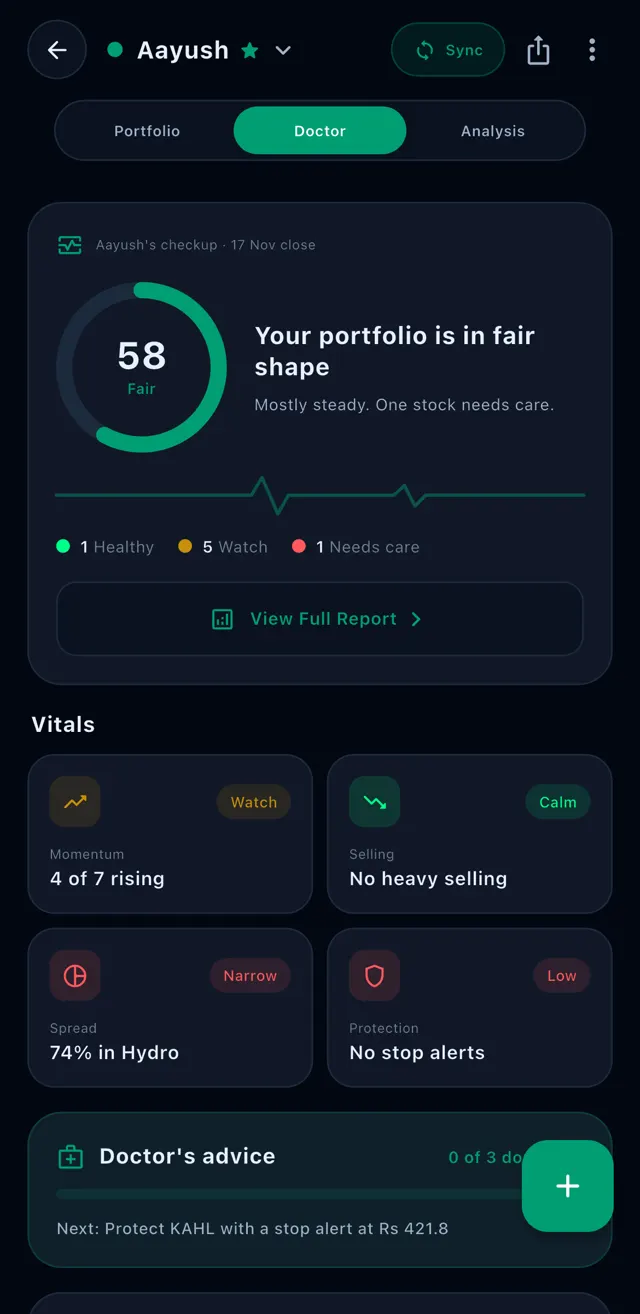
At the top you see a score out of 100 and one short sentence, like "Your portfolio is in fair shape. Mostly steady. One stock needs care."
The score is a grade you can understand at a glance: Great, Good, Fair, Weak or Poor. Under it, your stocks are counted in three groups, so you know how many are fine and how many need you.
- Healthy: the stock is doing well
- Watch: nothing wrong yet, but keep an eye on it
- Needs care: the stock is falling and needs your attention
Four vital signs, in plain words
A doctor checks your pulse, your temperature and your blood pressure. Portfolio Doctor checks four things about your money, and each one comes with a short answer and a colour.
- Momentum: how many of your stocks are going up. For example, "4 of 7 rising".
- Selling: whether big sellers were busy in your stocks on the last trading day. "No heavy selling" is what you want to see.
- Spread: how much of your money sits in one sector. "74% in Hydro" means one bad week for hydropower is a bad week for you.
- Protection: how many of your stocks have a stop alert, so you hear about it if the price falls too far.
Every stock gets a tag, and a reason
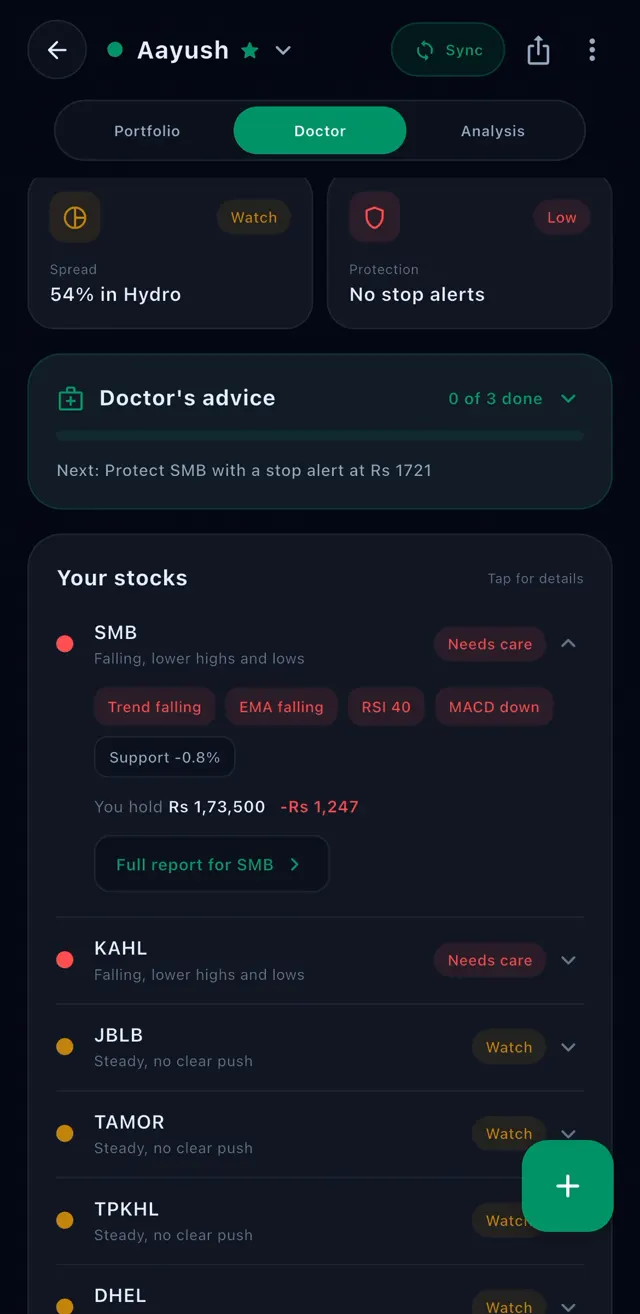
Below the vital signs, every stock you own is listed with its tag: Healthy, Watch or Needs care. The ones that need care come first, and bigger holdings come before smaller ones.
Each tag comes with a reason in a few words, like "Falling, lower highs and lows" or "One big buyer today". Tap a stock to see a little more: what you hold, how much you are up or down, and a link to its full report.
Doctor's advice: a few small steps for today
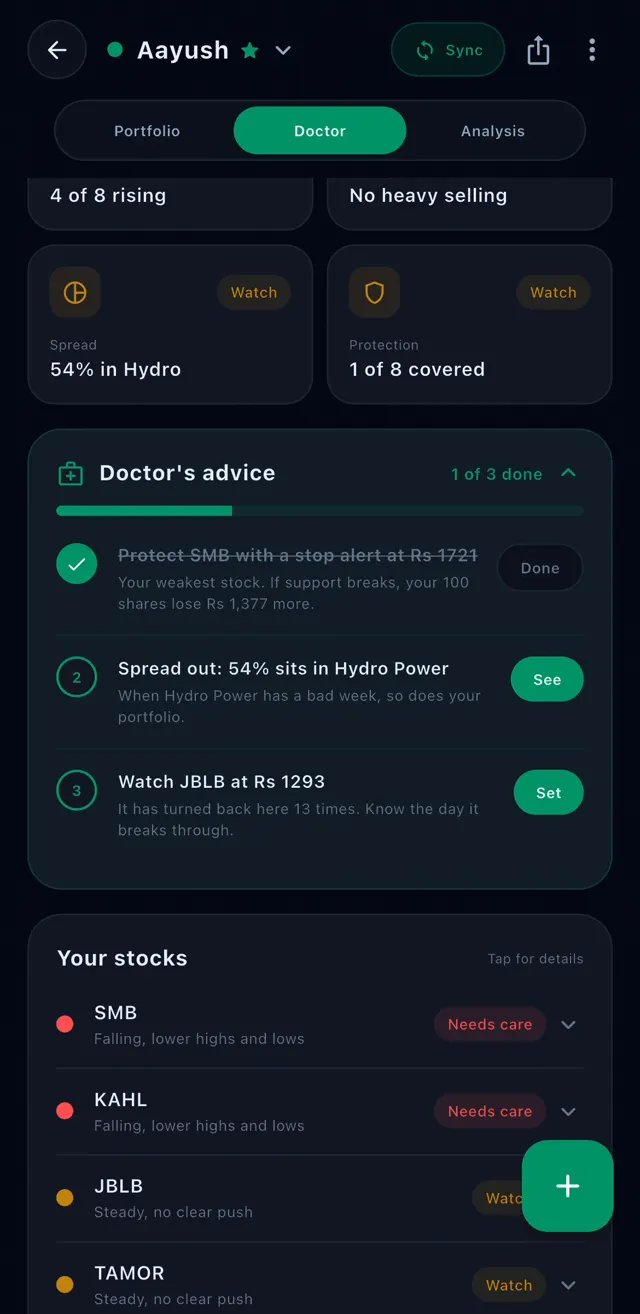
This is the part we like most. Portfolio Doctor gives you up to three small, clear steps. Not a long report. Just what to do next.
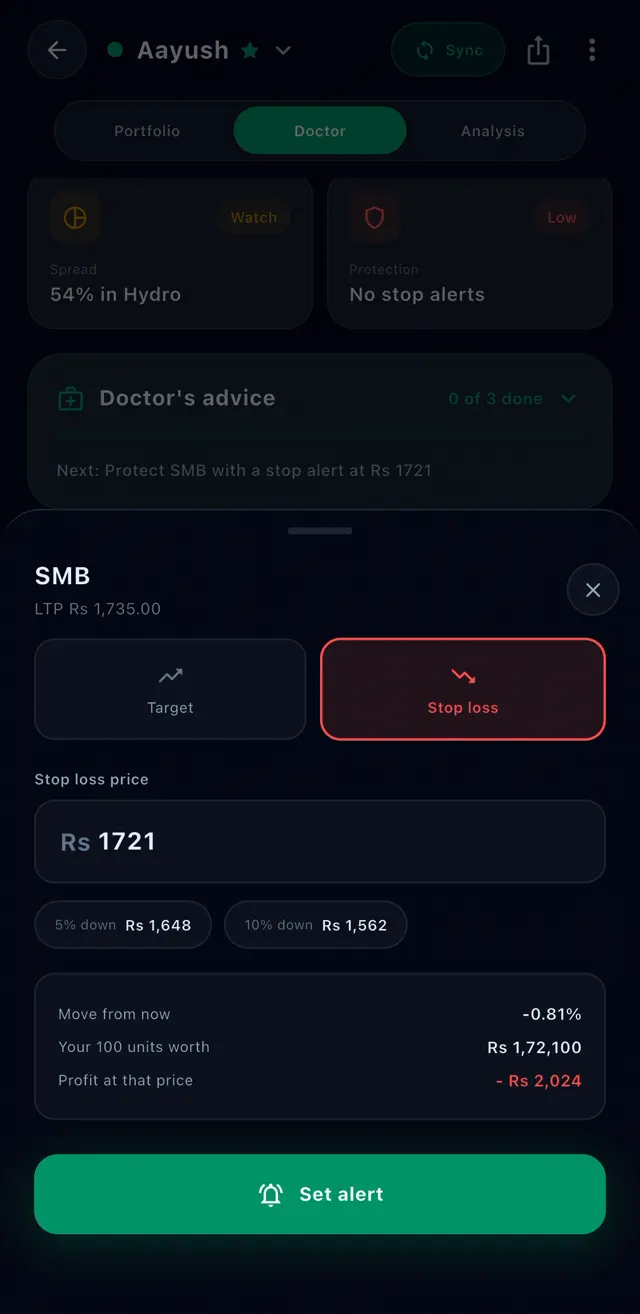
A step can look like "Protect SMB with a stop alert at Rs 1,721", "Spread out: 54% sits in Hydro Power" or "Watch JBLB at Rs 1,293". Each step has one button: Set, See or Done.
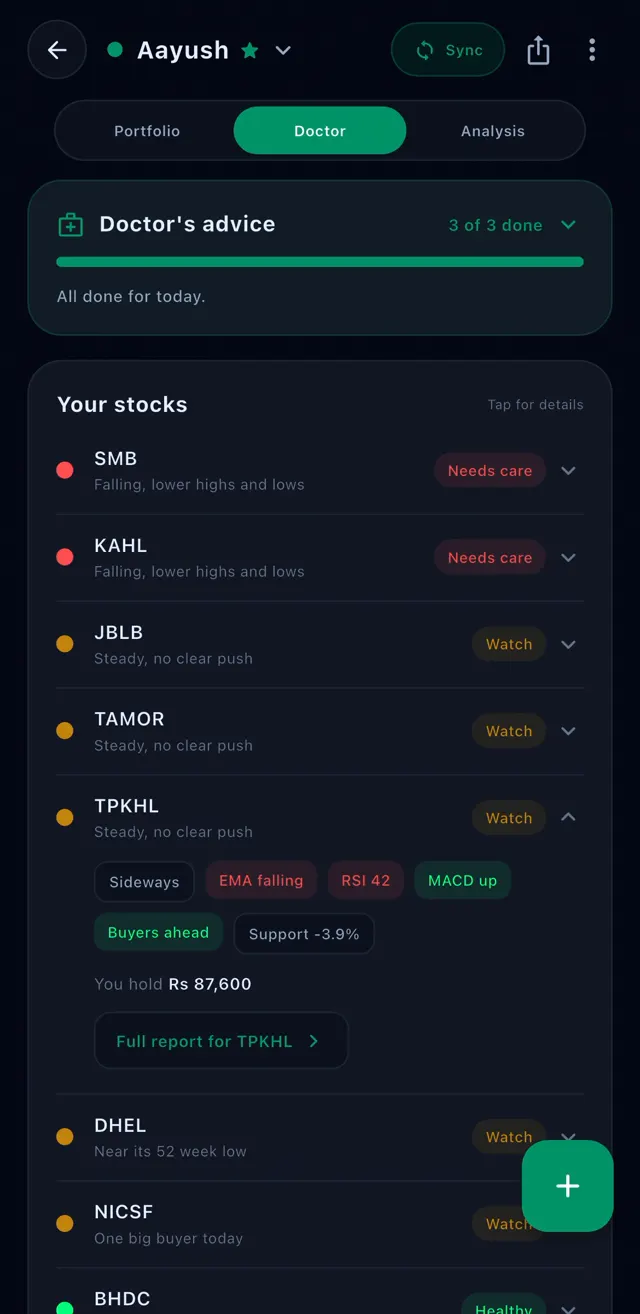
As you finish each step, it is ticked off. When all of them are done, the doctor says "All done for today" and the next checkup comes after the next market close.
Set an alert in one tap
Most of the advice ends in an alert, because an alert does the watching for you.
A stop alert is a price below today's price. If the stock falls to it, StockYan tells you, so a drop never goes unnoticed. A target alert is a price above today's price, so you know when the stock reaches the level you were hoping for.
Portfolio Doctor suggests the price for you. Before you save it, you see how much your shares would be worth at that price and how much you would gain or lose. Tap Set alert and you are done.
Look closer at any stock
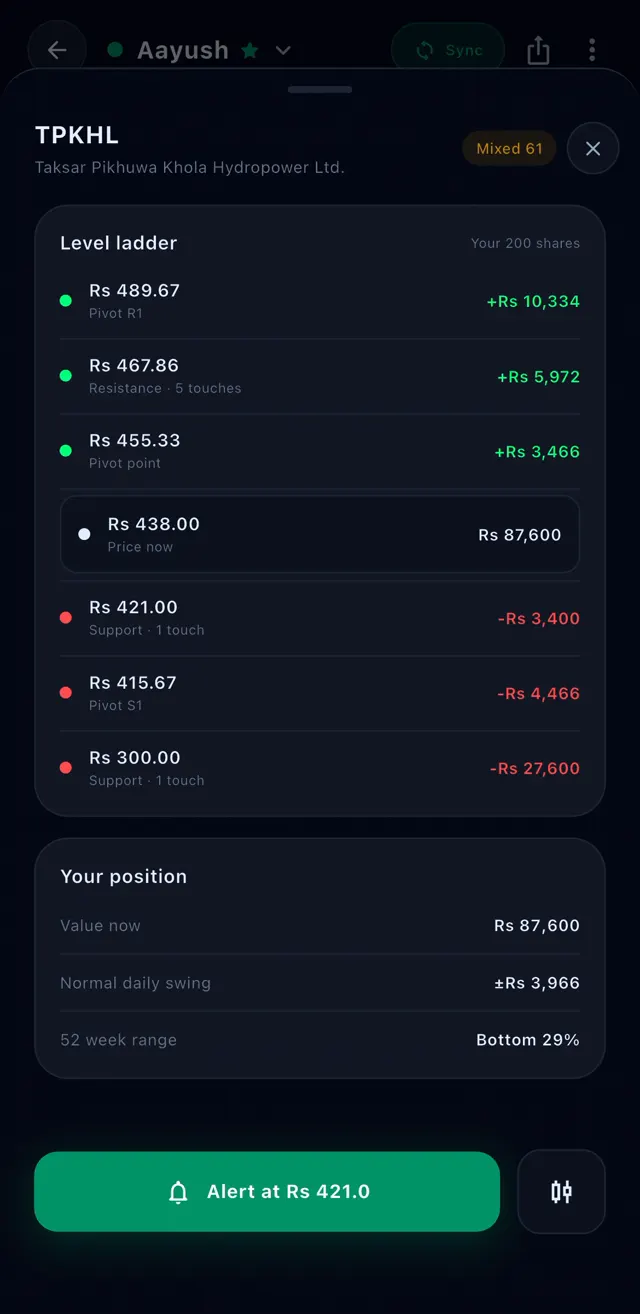
Tap any stock to open its page inside the doctor. You see its price today, the prices where it often stops falling or stops rising, and how far each one is from today's price in rupees for your shares.
You also see your position: what your shares are worth now, how much the price normally moves in a day, and where today's price sits in the last 52 weeks.
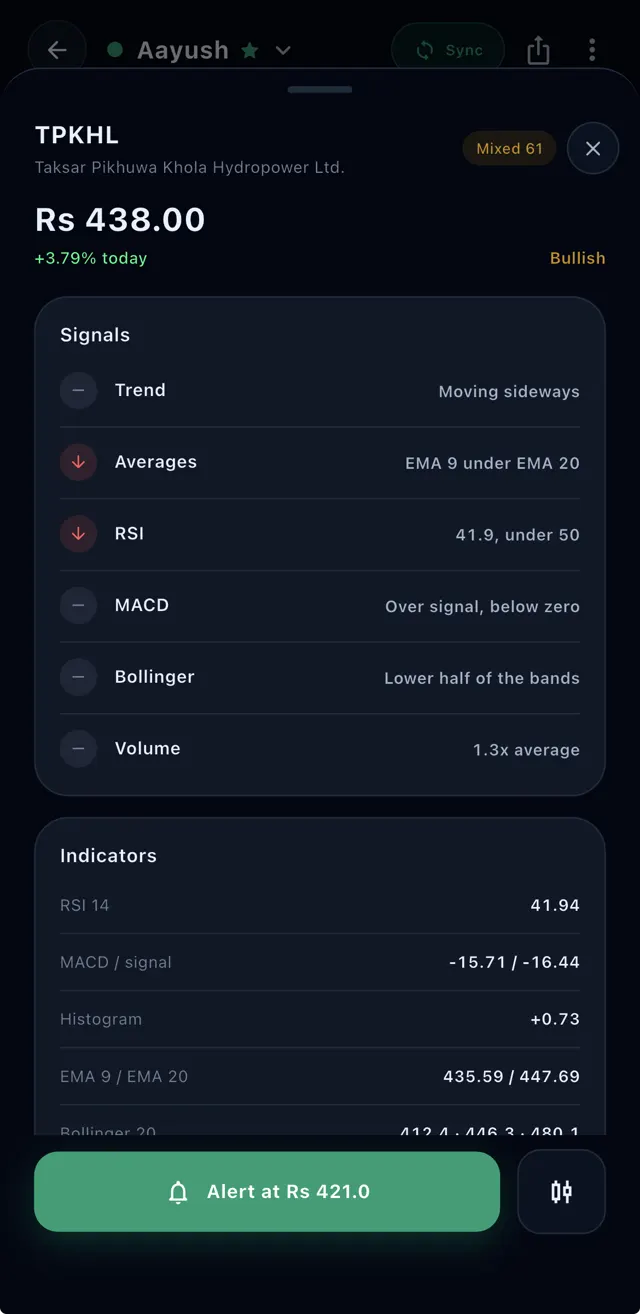
If you like more detail, the signals the doctor used are listed too, like the trend, the averages and the trading volume. You do not need them to follow the advice. They are there when you want to learn.
The full report, when you want everything
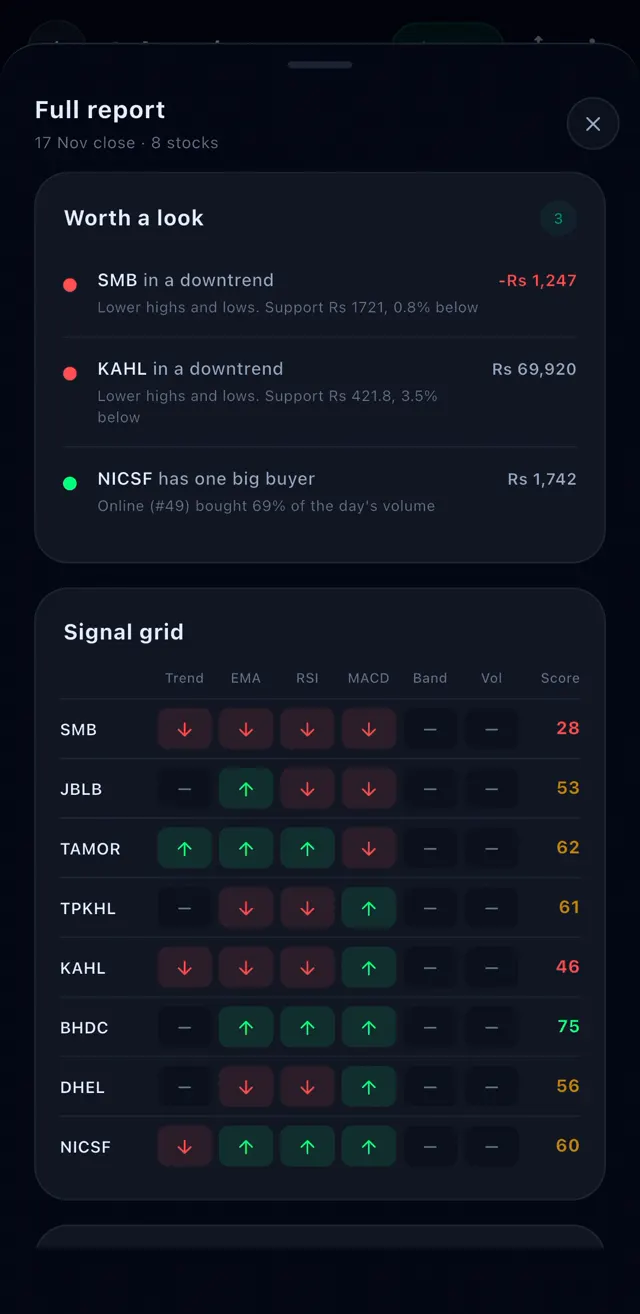
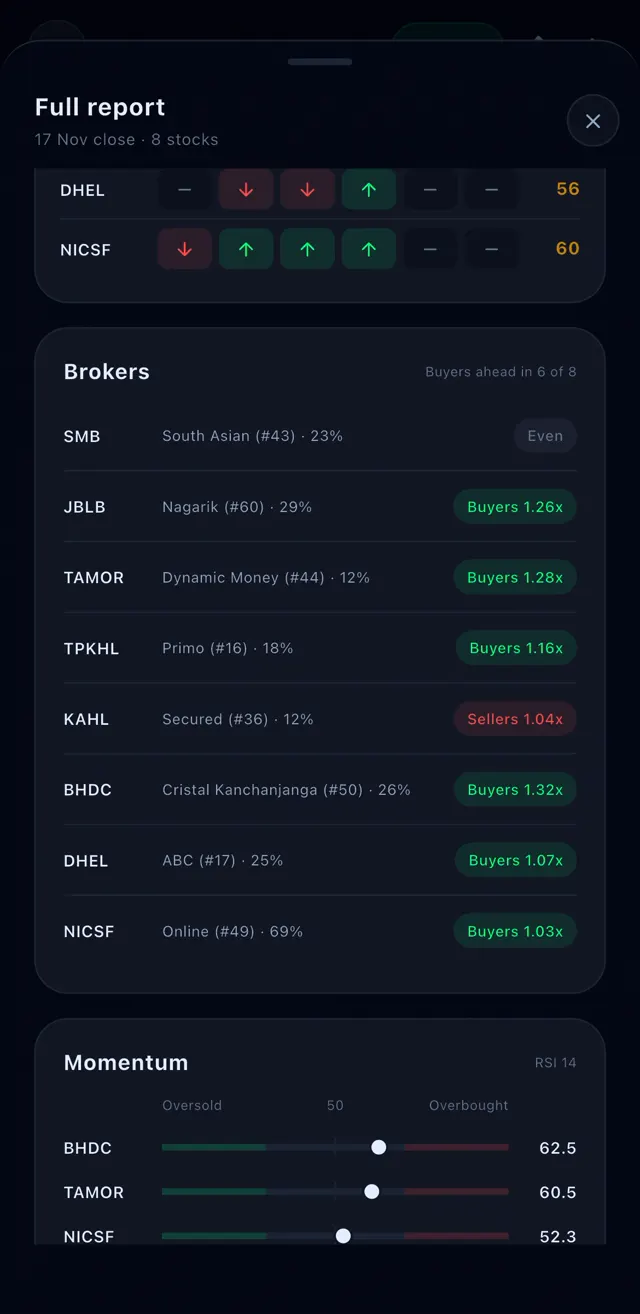
Tap View Full Report for the whole picture on one page. It starts with the stocks worth a look and why, then shows all your stocks side by side so you can compare them in seconds.
It also shows which brokers have been buying or selling each of your stocks, how strong each stock has been lately, and the nearest prices where your stocks may stop falling or rising.
What the doctor will never do
Portfolio Doctor will never tell you to buy or sell a share. It reads your portfolio and suggests safe things you can do in the app, like setting an alert or looking at how your money is spread. The decision is always yours.
It also tells you how fresh the checkup is. You always see the date of the market close it is based on, so you never act on old information.
Built on the most complete portfolio for NEPSE
Portfolio Doctor lives inside the StockYan portfolio, next to the Portfolio and Analysis tabs. It can only give a good checkup because the portfolio under it is complete and correct.
Here is what you get in the portfolio itself:
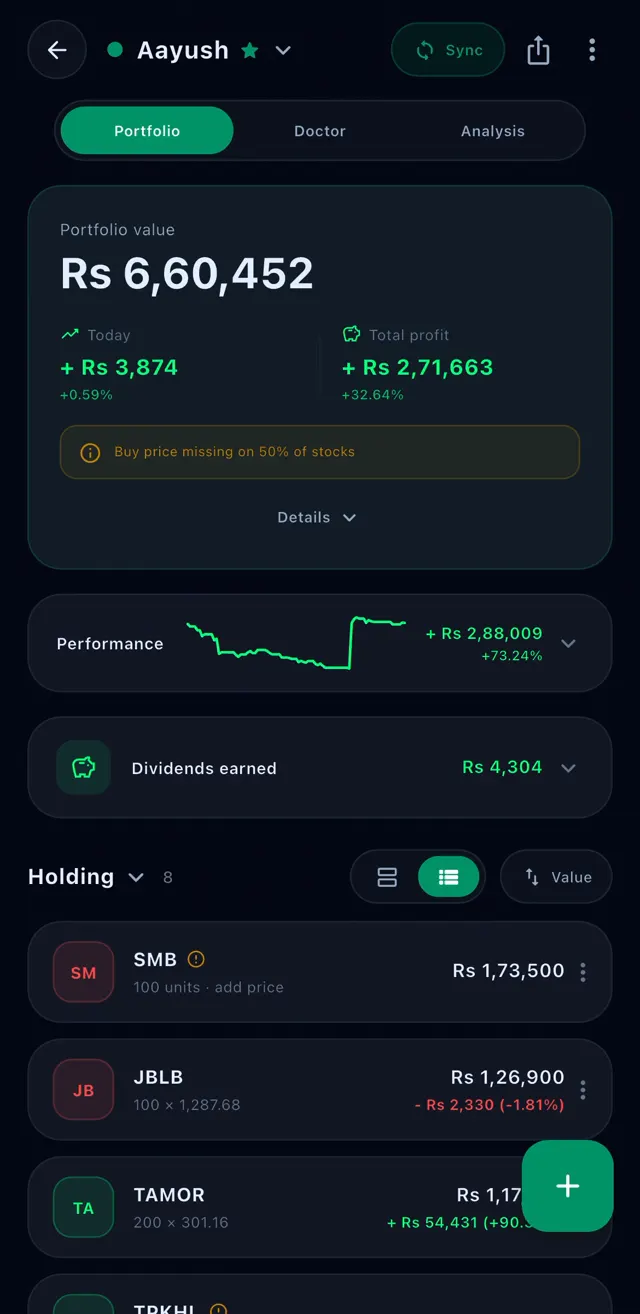
- MeroShare sync in a few taps. Your shares and your buy and sell history come in by themselves, and nothing is added twice when you sync again. StockYan only reads your data and never changes anything in MeroShare. Your login stays on your phone.
- Your real profit. Broker commission, SEBON fee, DP charge and capital gains tax are already taken out, so you see the money you would really keep.
- Today's profit and your total profit, live while the market is open.
- A chart of how your portfolio has grown, and every dividend you have earned.
- A portfolio for every family member, each with its own MeroShare account.
- TMS file upload, or add a single buy or sell yourself in seconds.
- One account on Android, iPhone, iPad, Windows, Mac and Linux. Add a share on your phone and it is already on your laptop.
Free and Pro
Everyone gets the full portfolio for free, plus the Portfolio Doctor score and the four vital signs. That alone tells you how your portfolio is doing every day.
StockYan Pro unlocks the rest of the doctor: the daily advice, the tag and reason for every stock, the stock pages and the full report.
How to open Portfolio Doctor
It takes less than a minute:
- Update StockYan to the latest version.
- Open your Portfolio.
- Tap Doctor at the top, between Portfolio and Analysis.
- Read your score, then follow the doctor's advice one step at a time.
- No portfolio yet? Sync from MeroShare or add your shares first. The checkup appears as soon as your stocks have a little price history.
A morning with Portfolio Doctor
You open StockYan before the market opens. Your score is 58: fair shape. Seven stocks, one Healthy, five to Watch and one that Needs care.
The doctor's first step says SMB is your weakest stock and suggests a stop alert at Rs 1,721. You tap Set, check the numbers and save it. One step done.
The second step points out that more than half your money is in hydropower. You tap See, look at how your money is spread and note it for your next buy. Two done.
The last step asks you to watch JBLB at Rs 1,293, where it has turned back many times before. You set a target alert. "All done for today." The whole thing took two minutes.